
Excel Table Trick # 21. Get a tailor made data entry form for each table independently - Unearth!
For those who don’t know it will be like finding a hidden treasure. Excel forms feature is not visible and accessible from the ribbon. So a lot of excel beginners don’t know of its existence. Excel forms is one way of making data entry easy and smooth and formal in looks. Every table comes with its own individual form by default and can be used to populate table.
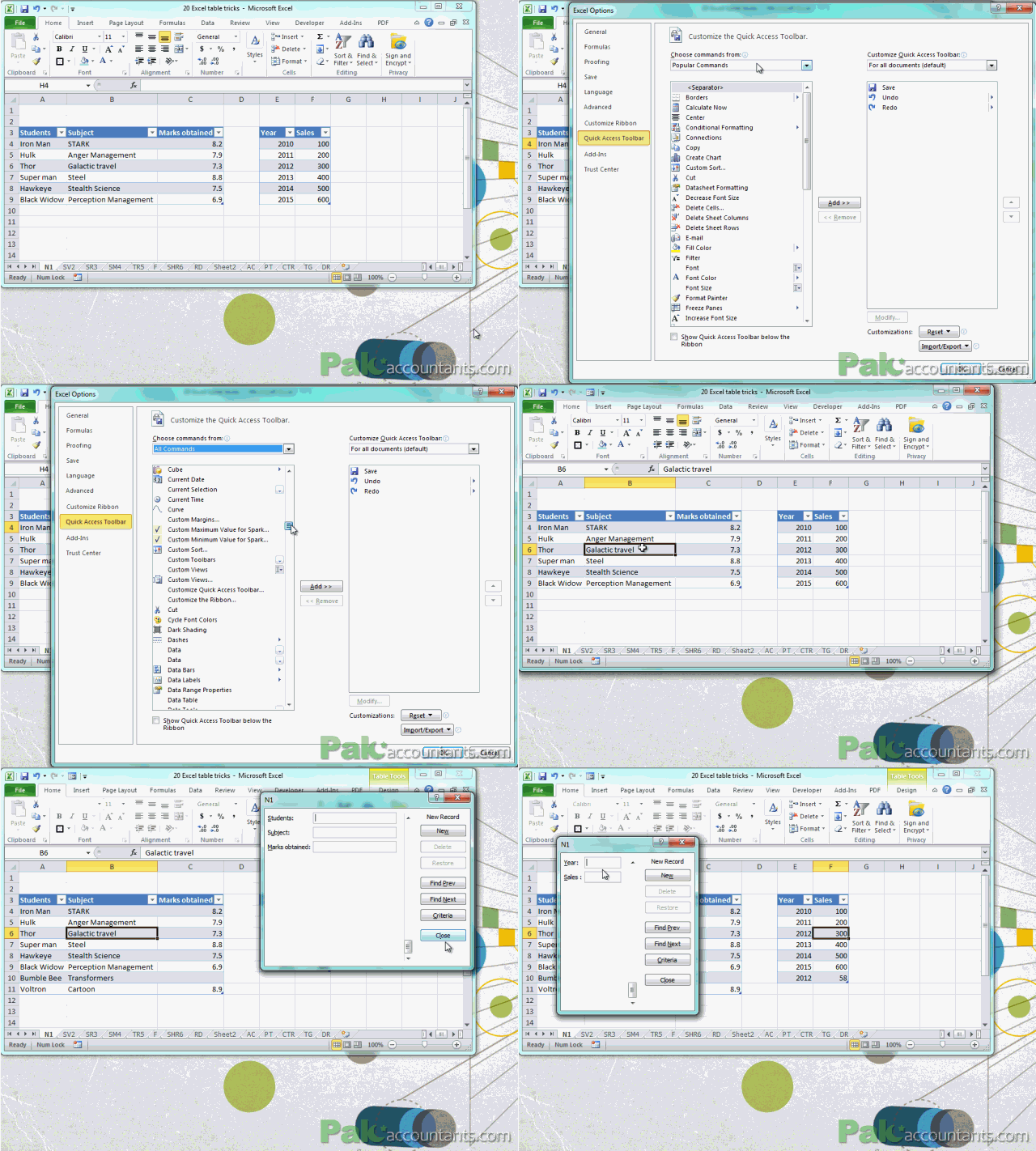
To access forms follow these steps:
Step 1: Right click on quick access tool bar (yes that little button bar you thought is no better than saving or undo button is a complete package). From the menu select “Customize quick access toolbar”
Step 2: Excel options window will open. From the “Choose commands from” drop-down menu select “All commands”
Step 3: Scroll waaaay down to find “Form…” Don’t worry list is alphabetically ordered so finding it won’t be that hard. Once found click Add button. And finally click OK at the bottom of excel options window.
There you have forms button in your quick access toolbar. Have the active cell within table and click the button. And a form will appear to let you enter data in the table. Smoooth!

very resourceful material to learn excel in out
@Mike thanks 🙂 help spread the word so that others in need can also get it