
28. Move or modify formula range easily
If you apply formula then excel highlights each range with different colour. This not only help you identify what range relates to what argument in the formula but also you can extend or reduce the range or even move the range while in edit mode to quickly update the formula.
To move the range simply left click and hold on any border of range and while holding the left mouse button down drag it to another place.
To expand or contract the range you can use corners and just when mouse turns two directional pointer click and hold mouse left button and drag. It will update the range accordingly.

29. Select whole worksheet by clicking the button where rows and columns intersect
Most of Excel users know about this smart selection button. But if you don’t then it is one great alternative to Ctrl+A to select whole worksheet at once.

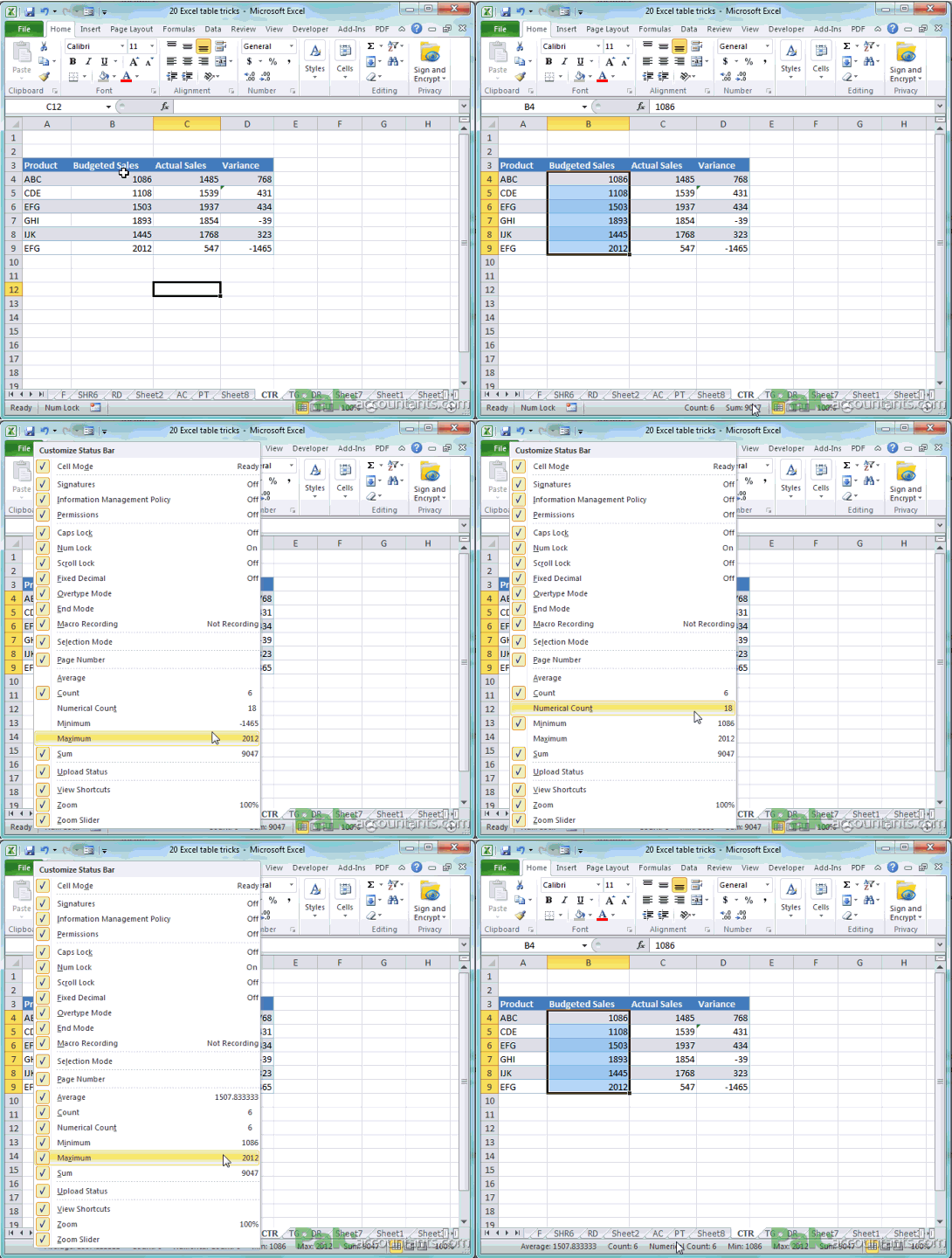
30. Right click status bar to enable multiple options like average etc.
Status bar which is located at the bottom of the excel application window is home to some of usual information user needs. For example if you select few cells then it gives you information regarding sum of numerical content, count of number of cells selected, average of numbers within selection etc. However, you can select or deselect more of such information by right clicking status bar and check/uncheck desired information.

Asslam O Alakum
Masha Allah Its very good effort to support students and professionals.