
6. Double click pivot table item to drill down
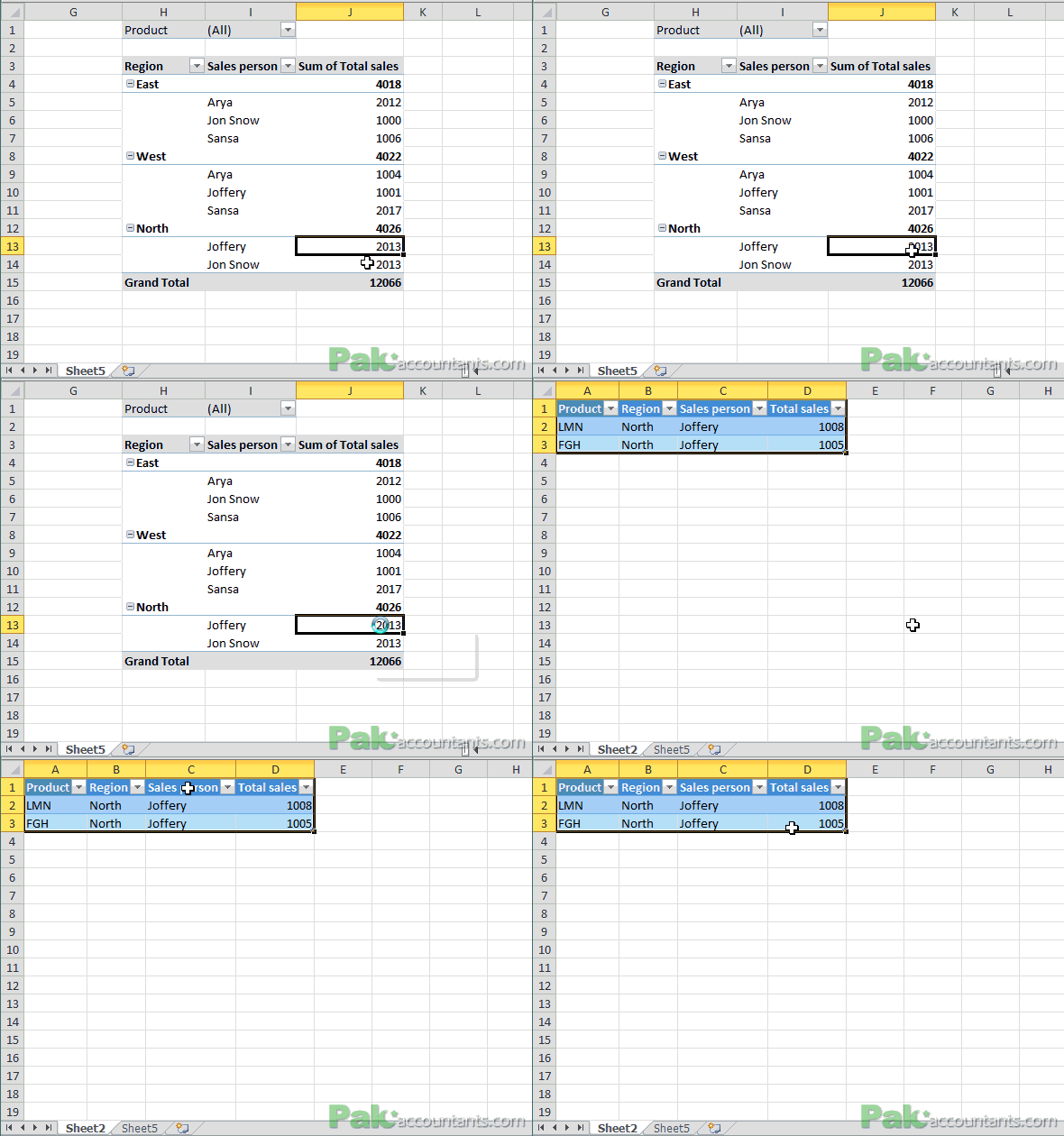
In a pivot table figures are reported on summarized basis usually summed up in one group. If you are interested in knowing that how pivot table calculated this amount then simply double click it and a sub-report or mini report in a new worksheet will be generated detailing how the figure has been reached and reported in pivot table.
7. Double click splitter to activate split screen
Split screen function let you divide the same worksheet in two or four work zones so that you can easily move one zone without affecting the other. It is very useful in case you have a large worksheet and you are getting annoyed of scrolling between rows and columns.
To activate the splitters you can click drag them or simply double click them. To deactivate double click the splitters itself. If you have both splitters activated then double clicking the point where two are intersecting will deactivate or collapse both of them.

8. Double click office icon to close excel active window
Clicking the cross button at the top right corner of excel window will close the whole excel application i.e. closing all the opened workbooks. But if you double click the excel icon at the top left corner of the excel window it will close just the active workbook. If you have multiple windows opened for the same worksheet then active window will gets closed.
So next time you might think of going left of your screen instead of right 😀


Asslam O Alakum
Masha Allah Its very good effort to support students and professionals.