SUBTOTAL - A multi-tool of functions
Normally the term subtotal refers summing up partial set of figures out of larger group, however Excel’s SUBTOTAL function can perform one of eleven operations which users can select through numbers against function_num argument.
Main benefit of using SUBTOTAL over SUM, AVERAGE or other functions is that it excludes filtered out rows/columns from calculation.
Syntax of SUBTOTAL function is as follows:
SUBTOTAL(function_num,ref1,[ref2],…)
Function_num helps determine the type of operation user is intended to perform using numbers 1 through 11 or 101 through 111. Functions against 1 through 11 and 101 through 111 are same but their application is a little different as 1 through 11 includes manually hidden rows whereas 101 through 111 excludes manually hidden rows from calculation. Filtered out results are always excluded from calculation.
Here is one example:

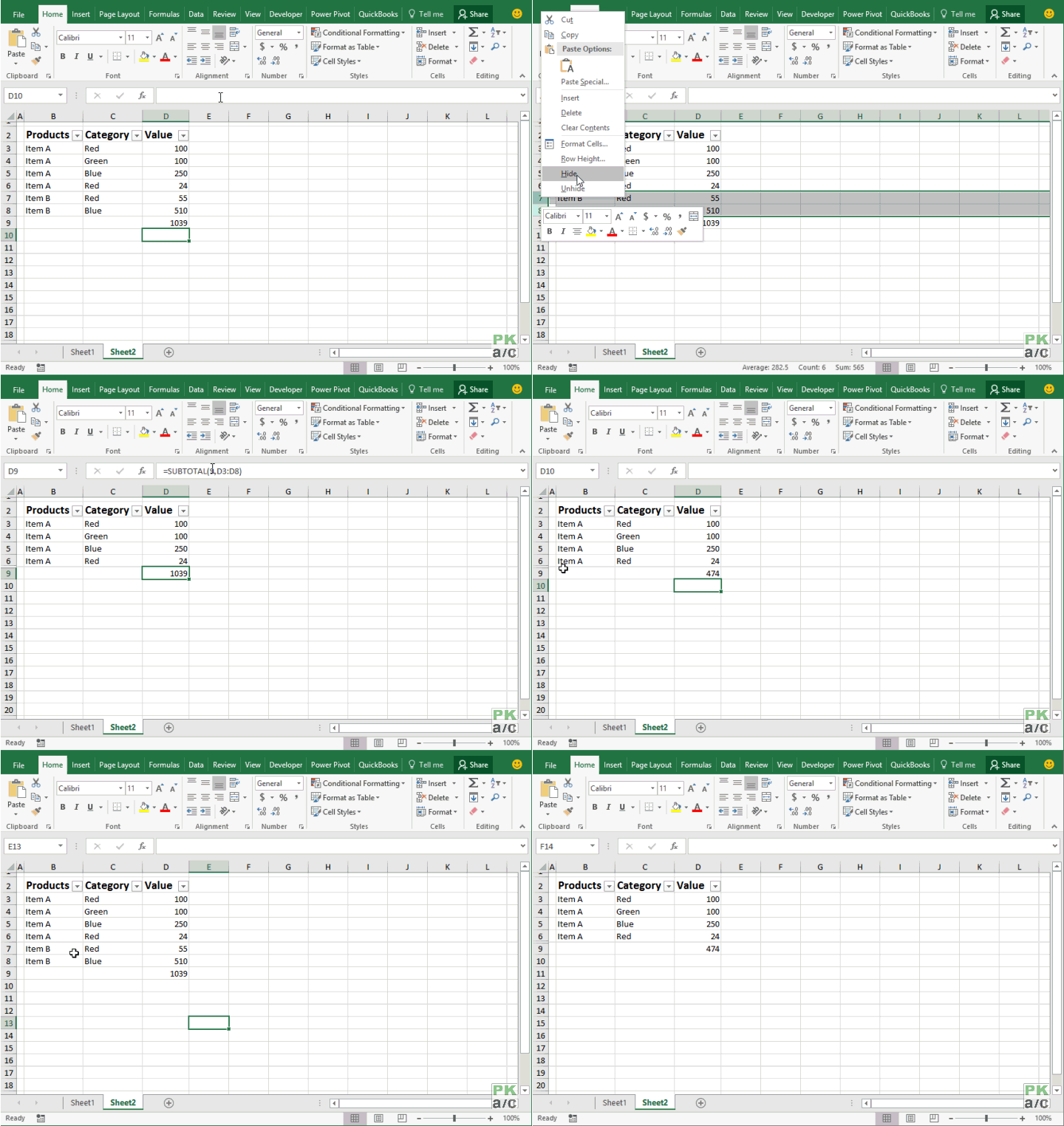
In the above illustration you can see that if results are not filtered, sum operation through SUBTOTAL function works just like SUM function of Excel.
However, once you filter the results, sum will change and will consider only visible rows as shown following:

However, as we used “9” as function_num therefore, by manually hiding a row, it won’t change anything unless we edit the formula and make it 109 so that formula exclude not only filtered out results but also manually hidden rows. Following illustration explains: